Ispirer Website
Ispirer Capabilities: Sybase ASE Migration
Free Trial
Sybase ASE: ODBC Driver Installation
Here is a step by step guide on how to install the ODBC driver for Sybase ASE.
You can download the Sybase Adaptive Server Enterprise Suite, that includes the ODBC Driver from the official website.
First of all you should Register on the SAP platform.
After completing the registration and logging in, please navigate to the SAP trials and downloads page.
On this page, please search for the SAP ASE Software Development Kit (SDK) or the relevant SAP ASE installation package, depending on your operating system and environment. For example:
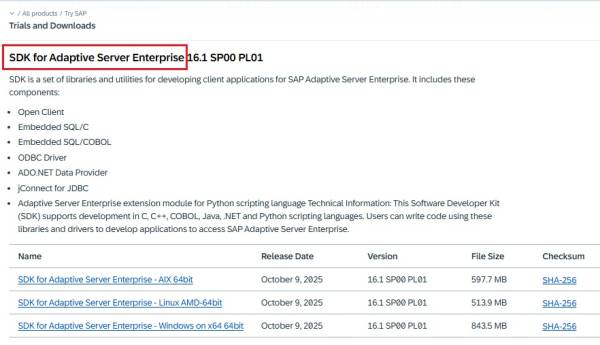
The ODBC driver is included as part of these distributions.
You need to choose the appropriate version, download it and perform the setup on the machine where you will do the database migration.
- Go through the pages of Wizard by button “Next”.

- Choose the installation directory.

- Select the Typical type.

- Select the license.

- Set up the region and read and accept the license agreement.

- Review the Pre-Installation Summary and run the installation

- Configure the installation

- Close the installer.

Then set up the ODBC connection the way it is described in the article: ODBC Driver Configuration
If you have any other questions, please contact us: support@ispirer.com