Ispirer Website
Ispirer Toolkit Overview
Free Trial
SQLWays: Setting Options
This article provides a high-level overview of how conversion options are organized and managed in SQLWays. It explains the purpose of option sections, the role of individual options, and the general principles of configuring and extending them to control the behavior of conversion rules.
In SQLWays, conversion options define how source database objects are analyzed and converted into target database code. These options influence a wide range of behaviors, including:
- Object and identifier naming
- Schema qualification and mapping
- DDL generation
- Target-specific syntax handling
Options are evaluated by the conversion engine during migration and are applied consistently across all selected objects within a project.
All options added to the GUI are shown in the screenshot below:
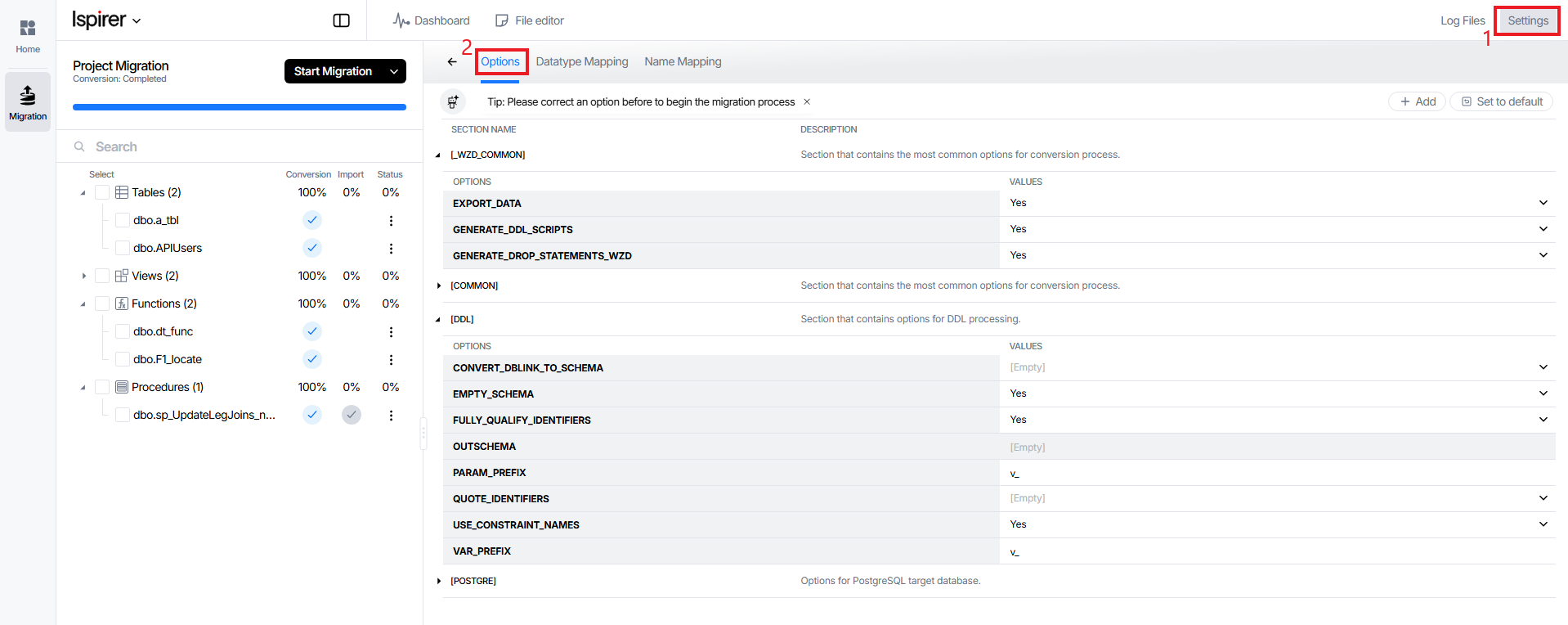
Sections
All options in SQLWays are grouped into sections. A section represents a logical category of configuration and typically corresponds to a specific aspect of the conversion process.
Common types of sections include:
- General sections
Contain options that apply globally to the conversion process, regardless of source or target platform.
- DDL-related sections
Control how Data Definition Language statements are generated and adapted for the target database.
- Target-specific sections
Contain options that are relevant only for a specific target platform (for example, [POSTGRE]).
Each section can contain multiple options, and sections are independent of each other.
Options
An option represents a configurable parameter that affects one or more conversion rules.
Each option has:
- A unique name (identifier)
- A value (explicit or empty)
- A defined scope (the section it belongs to)
Option values may be:
- Enumerated (predefined list of values)
- Text-based (strings, prefixes, schema names, etc.)
If an option value is not explicitly set, the conversion engine applies its default behavior for that option.
Default Behavior and Overrides
SQLWays tool provides a set of predefined default values for all supported options. These defaults represent the recommended baseline configuration for general migrations.
In addition to the predefined configuration, SQLWays supports extending the options.
Users can:
- Add existing sections to group project-specific or customer-specific options
- Add new options within existing sections
- Define default values for custom options
To add another section necessary to change the conversion rules, use the screenshot below:

Scope and Consistency
Options configured in SQLWays are applied consistently across the entire migration project. Once set, they affect:
- All selected source objects
- All conversion runs within the project
- All generated target code, unless explicitly overridden
This ensures predictable and repeatable conversion results.
The system validates the option configuration before conversion begins. If an option value is missing or invalid for the selected migration context, the user is notified and required to correct the configuration.
A complete and up-to-date list of all supported options, including descriptions, allowed values, and defaults, is available in the official reference:
All supported SQLWays options: Different options for the SQLWays Tool.
The options system in SQLWays provides a flexible and extensible way to control conversion behavior. By organizing options into logical sections, supporting defaults and overrides, and allowing custom extensions, the tool enables both simple migrations and highly customized conversion scenarios.
Related Topics
If you have any questions or face any difficulties, please contact our support team at support@ispirer.com