Selecting Source Objects from a File
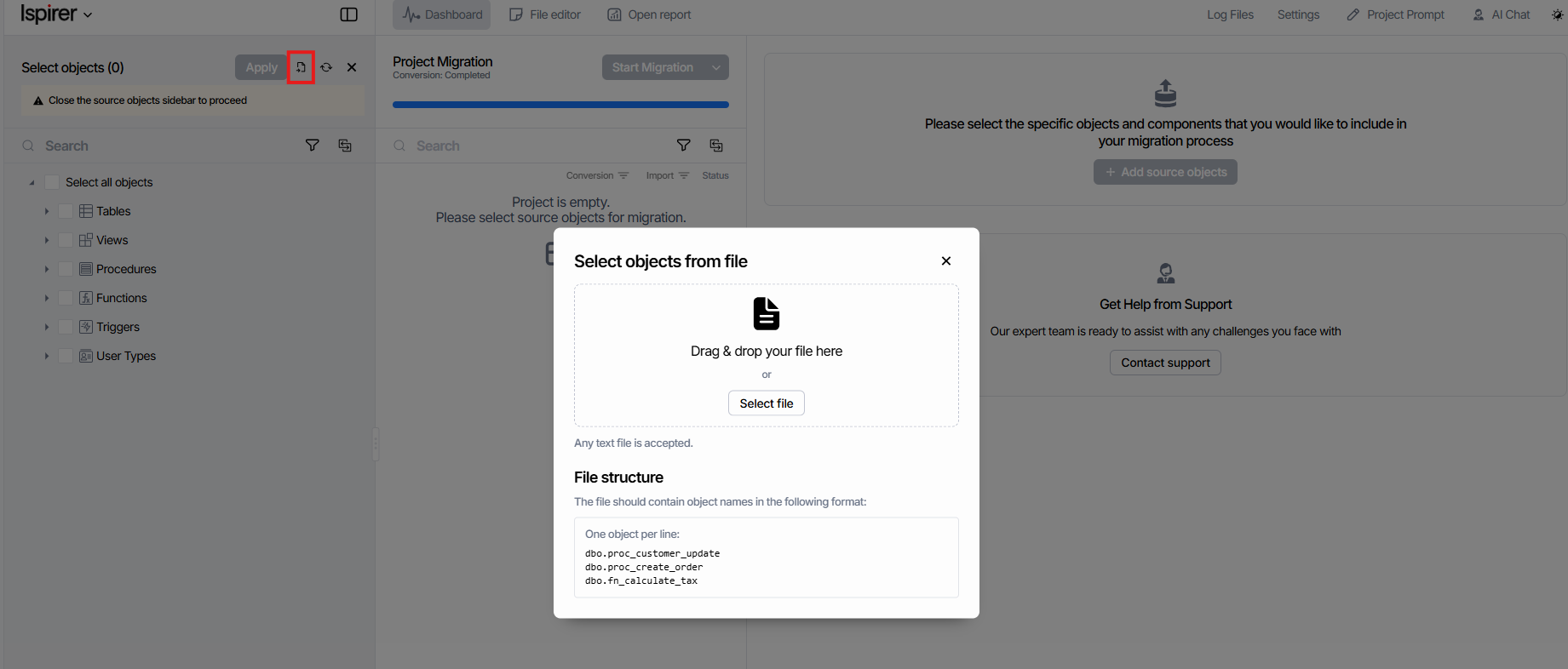
The «Select objects from file» feature lets you select multiple source database objects for migration without checking each object individually. In «Migration», open the «Select objects» sidebar, click the «Select objects from file» (Import from file) icon, and upload a file using «Select file» or by dragging and dropping it into the application window.
The file should contain schema-qualified object names, such as dbo.proc_customer_update. Separate the names with line breaks or spaces. Any file extension is accepted as long as the content is plain text (.txt, .sql). SQLWays matches the supplied names against objects in the Source Tree and selects the matches. Previously selected objects remain selected; if they are also listed in the file, they are included in the number of objects selected from the file.
Example file contents
 dbo.proc_customer_update
 dbo.proc_create_order
 dbo.fn_calculate_tax
Space-separated names are also supported: dbo.proc_customer_update dbo.proc_create_order dbo.fn_calculate_tax
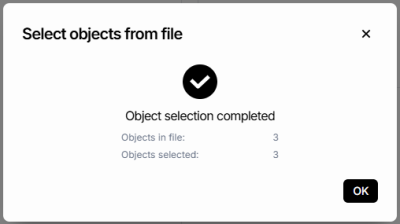
Once processing is complete, the «Object selection completed» dialog displays «Objects in file» (the number of objects listed in the file) and «Objects selected» (the number selected from the file). If not all objects are selected, a NOTE indicates possible reasons, such as names or schemas that do not match the current Source Tree or objects that are not present in the tree.
Click «OK» to close the result dialog, then click «Apply» in the «Select objects» sidebar to confirm your selection.
Related Topics
If you have any questions or face any difficulties, please contact our support team at support@ispirer.com