Ispirer Website
Ispirer Toolkit Overview
Free Trial
SQLWays: Schema Mapping
Schema Mapping defines how source schema names are handled and transformed in the generated target code.
Proper schema mapping is an important part of migration projects, especially when migrating to environments with different schema structures, naming conventions, or security models.
In the SQLWays tool, schema mapping is configured through Options. The following options in the [DDL] section control schema name behavior in the generated target scripts:
EMPTY_SCHEMAOUTSCHEMA
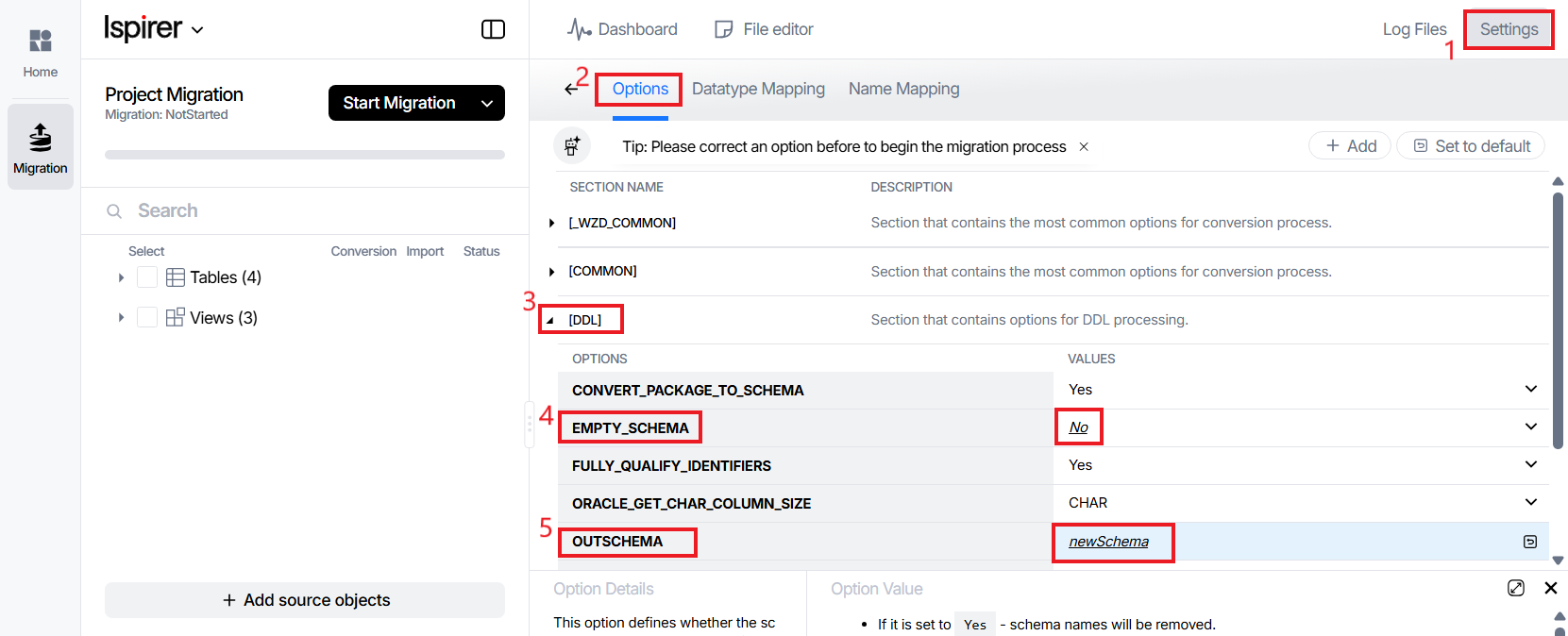
The behavior of schema mapping depends on the combination of these options:
EMPTY_SCHEMA = Yes⇒ Schema names are removed entirely, regardless ofOUTSCHEMA.
EMPTY_SCHEMA = DefaultandOUTSCHEMA=Empty⇒ Default source schemas are removed, while non-default schemas are saved.
EMPTY_SCHEMA = NoandOUTSCHEMA specified⇒ Source schema names are replaced with the value ofOUTSCHEMA.EMPTY_SCHEMA = DefaultandOUTSCHEMA specified⇒ Default source schemas are removed, while non-default schemas may be replaced depending on the configuration.
Correctly combining these options allows you to control how schemas appear in the generated target code precisely.
Schema Mapping options allow you to control whether schema names are preserved, removed, or replaced during migration.
You can adapt generated scripts to match the target database structure, simplify deployment, and ensure compatibility with existing schemas and environments by configuring EMPTY_SCHEMA and OUTSCHEMA options.
Related Topics
If you have any questions or face any difficulties, please contact our support team at support@ispirer.com