Ispirer Website
Ispirer Toolkit Overview
Free Trial
Custom Mapping
SQLWays provides a predefined list of supported data types for all database platforms.
These data types represent the standard set of types that can be used during database migrations and conversions.
In addition to the predefined list, SQLWays supports extending the data type list.
Users can:
- Use the predefined data types provided by SQLWays
- Add the conversion rules for custom data types specific to their database or migration project
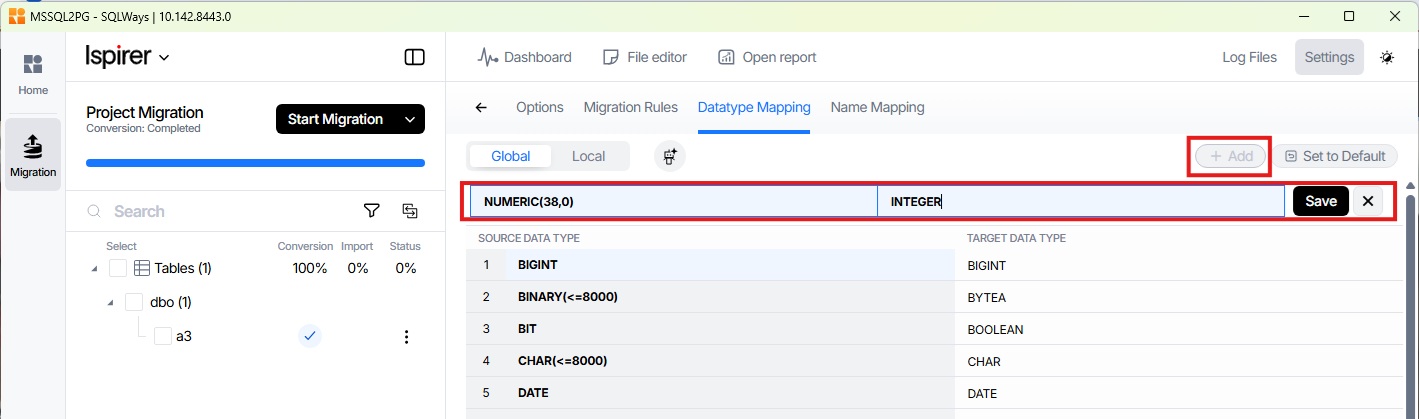
When a custom data type mapping is added, it is placed in a separate table at the top of the page. This ensures that the custom mapping has a higher priority than the default mapping provided by SQLWays. If both mappings apply to the same data type, SQLWays uses the custom mapping first. Within the table of custom data types, there are also a hierarchy: entries at the top have a higher priority than those further down.
To add a custom data type use the Add button located in the upper-right corner of the Settings window → Datatype Mapping → Global, enter your type and the type you want to convert to and save the new mapping as shown in the screenshot below:
Related Topics
If you have any questions or face any difficulties, please contact our support team at support@ispirer.com