Table of Contents
Ispirer Website
Ispirer Toolkit Overview
Free Trial
SQLWays: Running SQLWays in Parallel Mode
When Parallel Mode Is Useful?
Running SQLWays in parallel mode can be advantageous in the following scenarios:
- migrating a large database containing a significant number of SQL objects and substantial volumes of data
- migrating multiple databases simultaneously
- migrating a single very large table
In such cases, parallel execution allows you to optimize the migration process and can significantly improve the overall performance and throughput of the migration project.
How to Run in Parallel Mode
To perform a migration in parallel mode, you can switch between multiple projects in the SQLWays tool. For example, you can create an initial project, specify the set of database objects to be migrated in that process, and start the conversion. You can then create an additional project, assign a different set of objects or another database for conversion, and start the conversion process as well.
You can switch between projects by simply selecting the required project from the project list.
This approach can be reused as needed, allowing multiple migration processes to run in parallel. However, it is important to ensure that your working environment has sufficient system resources to support multiple concurrent conversion processes in SQLWays. Running more than five parallel conversion processes typically requires a powerful hardware configuration.
Please also note that each project in SQLWays uses its own dedicated migration project directory, as shown in the screenshot below:
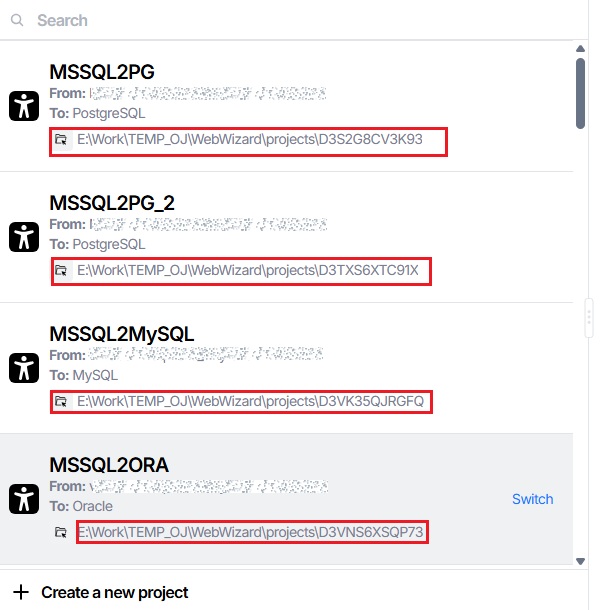
Migrating schema and data in separate processes
Step by Step guide on how to migrate set of objects and data in parallel mode can be found here.
Note: Running SQLWays in parallel mode may be in demand if a huge table is migrated. To do this, it is enough to divide the migration into several projects.
Ispirer Recommendations
- We recommend to divide the whole migration scope into the sets of objects that are independent from each other.
- If you are migrating a huge database or one table in separate processes, we recommend that the size of the data should be approximately equal in each migration set.
Related Topics
If you have any questions or face any difficulties, please contact our support team at support@ispirer.com