Table of Contents
Ispirer Website
Ispirer Toolkit Overview
Free Trial
SQLWays: Project Directory
To run a successful migration project, it is essential to understand how the Project Directory works. Although many beginners overlook this setting, it plays a critical role in the migration workflow and should be clearly understood before you start working with the tool.
A Migration Project represents a dedicated folder on disk that stores all information related to a specific migration process. This directory ensures that the migration can be consistently reproduced, resumed, or analyzed at any stage of the project lifecycle.
Global and Project Directories
The migration tool uses a two-level directory structure:
Global Directory
The Global Directory serves as a central repository for all project-specific directories. Each migration project created in the tool is stored as a separate subfolder inside this global directory.
By default, the global directory is located at: %USERPROFILE%\Documents\Ispirer\SQLWays Workspace
You can change the global directory location if needed, for example, to store projects on a different disk or within a corporate workspace.
How to Change the Global Directory:
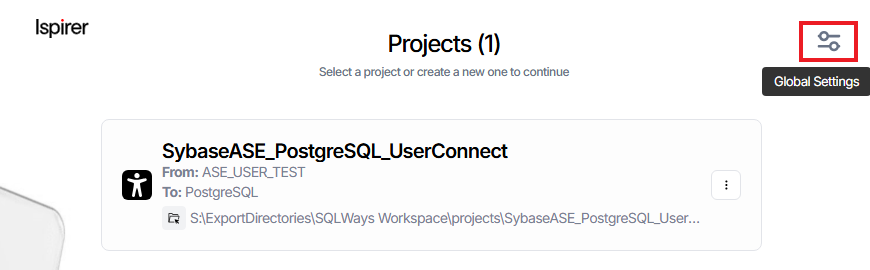
- Open the Projects page, where all existing projects are listed.
- Click the Global Settings button.
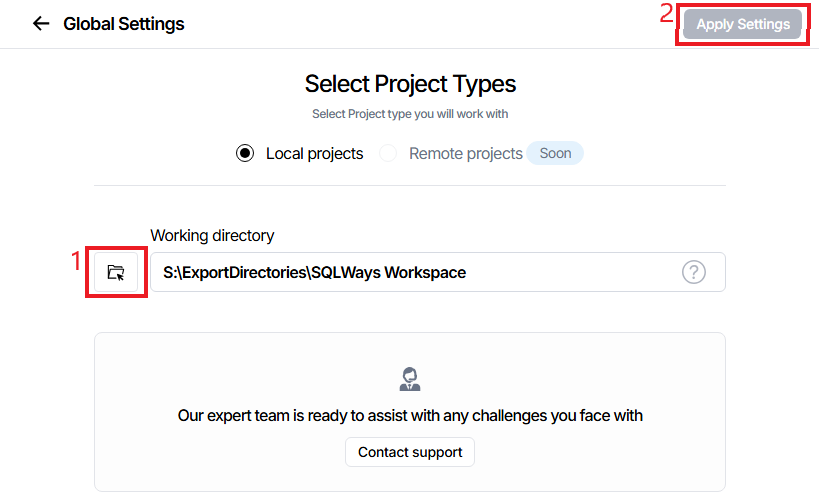
- Specify a custom path for the global working directory.
- Click Apply Settings to save and activate the new location.
Note:
At the moment, the tool supports only local projects.
However, support for Remote Projects is planned for future releases. Remote projects will allow multiple users to work collaboratively within the same migration project.
Project (Local) Directories
Each migration project has its own local directory, which is automatically created inside the global directory. The project directory name always matches the project name.
This directory contains all data required to manage, resume, or analyze the migration for that specific project.
Opening a Project Directory:
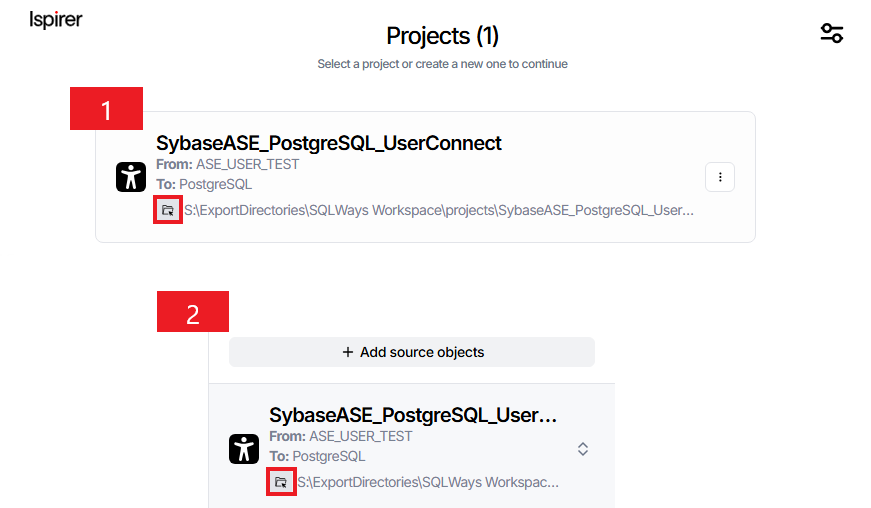
You can open a project directory in two ways:
- From the Projects list: ⇒ Click the folder (shortcut) icon next to the project name.
- From the Current Project Panel: ⇒ Use the directory shortcut available on the project overview page.
What Is Stored in the Project Directory
The project directory is the core storage location for the migration process. It contains all configuration data and operational metadata required by the tool.
All project-related information is persisted in the following files, which are stored directly in the project directory:
sqlways_db.ini— The settings file.sqlways.xml— The main project file that defines selected objects, mappings, and conversion configuration.sqlways_db.json— Contains conversion statuses.
Together, these files ensure that the migration process is fully traceable, repeatable, and recoverable.
This design allows you to safely close the tool, reopen it later, and continue working with the project without losing state or configuration.
Understanding the Project Directory structure is fundamental to working effectively with the migration tool. The global directory provides centralized project management, while each project directory encapsulates all migration-specific data.
By configuring the global directory correctly and knowing how to access project directories, you significantly reduce operational risks and improve overall migration reliability.
Related Topics
If you have any questions or face any difficulties, please contact our support team at support@ispirer.com