Table of Contents
Ispirer Website
Ispirer Toolkit Overview
Free Trial
SQLWays: Conversion modes
Our product has been on the market for more than two decades. Over this time, technologies have evolved significantly, while the existing conversion approach has accumulated a substantial amount of legacy code and numerous incremental improvements resulting from long-term product development. As a result, the architecture became increasingly complex, making further optimization more time-consuming and difficult.
To address these limitations, we initiated a complete refactoring of the conversion, including a review of its architecture and core algorithms.
At this stage, a new conversion approach has been implemented for Oracle-to-PostgreSQL conversion.
As a result of the refactoring:
- conversion performance has improved significantly;
- memory consumption has been substantially reduced;
- the resulting code is more accurate, maintainable, and optimized;
- runtime performance has been improved.
Overall, the refactoring has removed accumulated architectural limitations and established a more efficient foundation for the further development and optimization of the conversion.
Choosing the conversion mode
When creating a new project or configuring an existing one, you can specify which conversion mode should be used for the project:
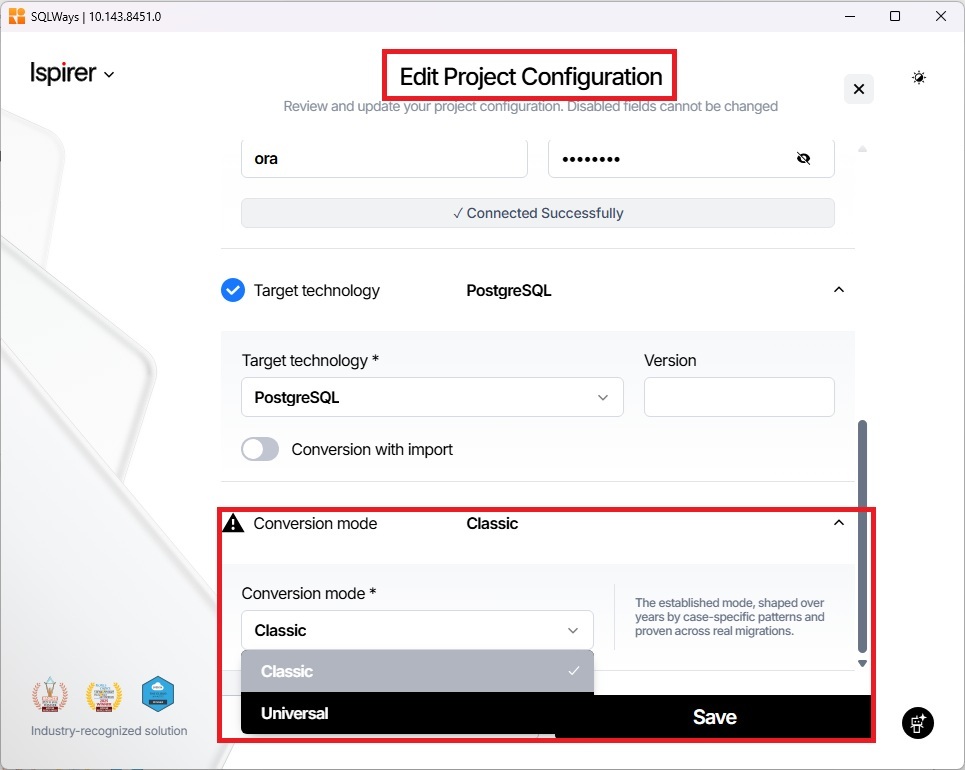
In the Conversion mode field, you can select one of following options:
- Classic — the legacy version of the conversion;
- Universal — the new version of the conversion.
The conversion mode is configured at the project level. This allows you to continue using the Classic conversion when necessary while gradually transitioning projects to the new Universal conversion.
The new conversion approach also provides a set of configuration options that allow you to fine-tune the conversion process according to your specific requirements.
These options control various aspects of the conversion and can be used to adjust its behavior for different migration scenarios.
For a detailed description of the available options and their configuration, see the article Options for Universal Conversion.
Related Topics
If you have any questions or face any difficulties, please contact our support team at support@ispirer.com