Ispirer Website
Ispirer Capabilities: Microsoft SQL Server Migration
Free Trial
Microsoft SQL Server ODBC Driver Installation for Windows
Check ODBC Data Source
Please check whether you already have Microsoft SQL Server ODBC driver installed on your machine. You can check it on the ODBC Data Source Administrator on the Driver tab.
If you see ODBC driver, then just tune the ODBC connection to the required SQL Server database.
If you don't see the SQL Server ODBC, then please proceed with installation and follow the instructions below.
- To download the ODBC Driver for SQL Server you should go to official Microsoft SQL Server site.
- Find sqlncli.msi in the folder with the SQL Server installation files or download it from the Microsoft Corp. website.
1. Copy sqlncli.msi file and run it.
Go through the pages by pressing on button 'Next'. Accept the license agreement.


2. Once the installation is completed, run the downloaded file to install the package.
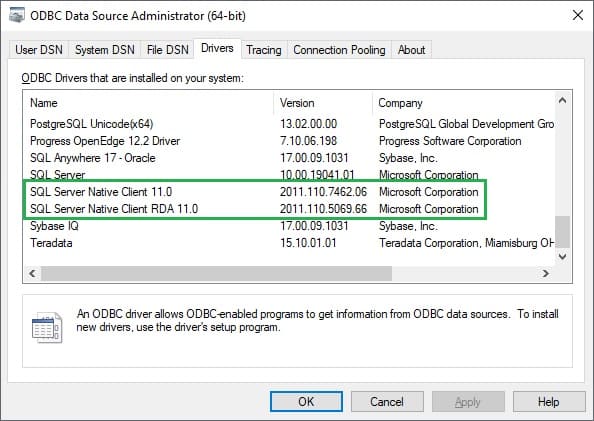
After you have installed the client, the “ODBC Data Source Administrator” should be upgraded as shown in the example below:
Then set up the ODBC connection the way it is described in the article: ODBC Driver Configuration
Once the ODBC Driver installation is completed, you can use it to connect to the Source Database in SQLWays tool. More information about this process here.
Another way to obtain Microsoft SQL Server ODBC Driver is to use the ODBC Driver connection method in the SQLWays tool for Source technology.
- In the Home menu, click on Create New Project
- Find Source technology tab. Click on Source database dropdown menu and select Oracle.
- Choose Connection method ODBC Driver
- Click on Install a driver. Then there will be a new window - click Install here. On this step the latest available ODBC Driver for MS SQL Server will be downloaded and installed to the machine, so you don’t need to do it manually. Usually it requires a couple of minutes.
- Once the downloading and installation process finish, you should proceed with providing the following information:
- Host
- Port
- Database name
- Username
- Password
- After all required fields are completed, click Test Connection.
If the connection is successful, the Source Technology section is marked with a checkmark, the Test Connection button label changes to Connected Successfully, and the user should proceed to fill in the information about the Target technology
If you have any questions or face with some difficulties, please contact us: support@ispirer.com