Table of Contents
IDM: Technical Overview & Internals
About IDM
The Ispirer Data Migration (IDM) tool is a dedicated solution designed for seamless, efficient, high-speed data migration from Oracle RDBMS (version 10 and above) to PostgreSQL RDBMS (version 14 and above), including all PostgreSQL-compatible forks and managed cloud services. It emphasizes high-speed data transfer while minimizing business downtime through an iterative, controlled migration approach. This controlled approach ensures data consistency between the source and target systems even as ongoing changes (inserts, updates, deletes) continue on the Oracle side during the primary data load.
The solution runs entirely on the PostgreSQL side using Foreign Data Wrappers (FDW). Nothing is installed on the Oracle source server or modified within it, and interaction with the source occurs exclusively in read-only mode. It supports true parallel processing and achieves a typical throughput of 250+ GB per hour per stream (actual performance depends on hardware, network bandwidth, data types, and table structure). The intuitive GUI allows users to manage projects, configure connections, select tables, monitor progress, and control the entire process without requiring deep SQL expertise, while all heavy lifting happens in the background via scheduled jobs that continue running after the GUI is closed.
Architecture and How IDM Works Under the Hood
IDM is built entirely on a set of PostgreSQL extensions and operates completely inside the target database. All data transfer happens through Foreign Data Wrappers: the target PostgreSQL server pulls data directly from Oracle over the network (direct TCP connectivity and proper TNS resolution from the PostgreSQL host are required). There are no intermediate files, no agents on Oracle, and no need for Archive/Redo logs or CDC.
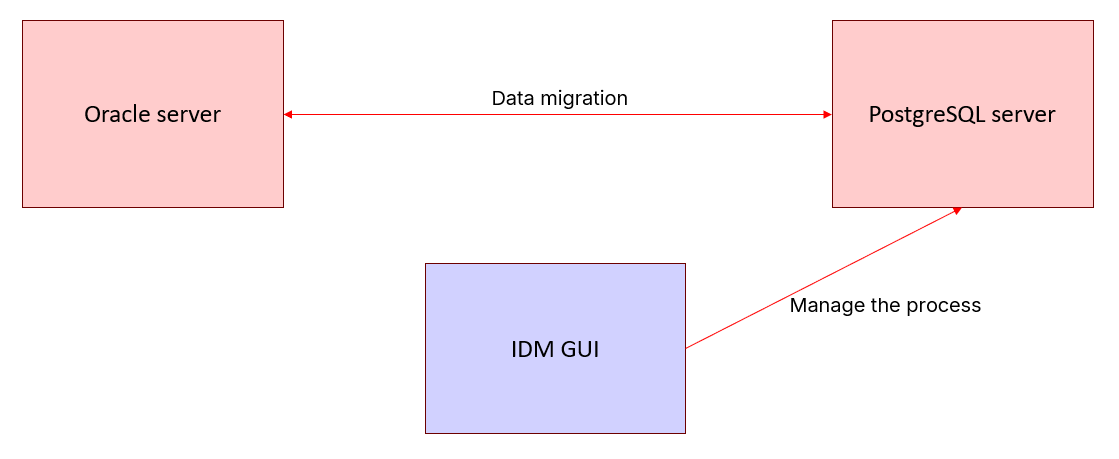
The migration itself is strictly iterative.
At the start of each iteration, IDM captures the current Oracle System Change Number (SCN), a specific point in the database timeline. Then, IDM migrates or updates all rows existing at that exact SCN. Any changes occurring on Oracle during the iteration are automatically caught and applied in the next iteration. Over time, iterations become progressively shorter until replication lag reaches near-zero. When the source becomes stable (or a Soft Stop is issued), the final iteration brings the target to a fully consistent state with zero lag.
This architecture enables true zero-downtime cutover: the source application is paused only for seconds at the very end, constraints/indexes/triggers are added, and traffic is switched to PostgreSQL.
The list of databases that can act as source and target for your data migration using the Ispirer Data Migration (IDM) solution is presented in the table below.
Supported Source and Target Databases
| Source Database | Target Database |
| Oracle RDBMS (version 11 and above) | PostgreSQL RDBMS (version 14 and above) The target PostgreSQL supports all major compatible forks and distributions, including Aurora PostgreSQL, RDS for PostgreSQL, and other managed cloud services, as long as the necessary extensions (such as `oracle_fdw`, `pg_cron`, `plv8`, etc.) can be installed. |
Setting Up the Source (Oracle)
The Oracle source requires only a dedicated read-only user with specific privileges. The database must be reachable over the network from the PostgreSQL host (firewalls, TNS listener, and service name resolution must be properly configured). No software is installed on Oracle, and no triggers or additional objects are created.
Execute the following script as an Oracle administrator (SYS or DBA role) to create the user (example name: ORACLE_USER) and grant privileges:
GRANT CREATE SESSION, CONNECT TO ORACLE_USER;
GRANT SELECT, FLASHBACK ON <schema>.<table> TO ORACLE_USER;
GRANT SELECT, FLASHBACK ON ALL_TAB_COLUMNS, all_objects, dba_tables,
dba_extents, dba_segments, dba_indexes, dba_lobs,
  V_$DATABASE TO ORACLE_USER;
To skip unmodified tables quickly and conserve resources, grant additional privileges. IDM solution does not use `ANALYZE` privilege to recalculate table statistics or perform other heavy operations, instead, it is used only to flush already collected statistics.
GRANT SELECT, FLASHBACK ON ALL_TAB_MODIFICATIONS, ALL_TAB_STATISTICS,
V_$LOCKED_OBJECT, V_$TRANSACTION TO ORACLE_USER;
GRANT ANALYZE ANY TO ORACLE_USER;
These grants enable consistent reads (FLASHBACK), metadata access, and the fast-skip optimization based on modification statistics.
Setting Up the Target (PostgreSQL)
The target database is PostgreSQL version 14 and higher (including all forks). This is where the entire IDM migration mechanism is located: the control schema, functions, metadata tables, and background tasks.
All extensions listed below must be installed before creating the first migration project. The installation is performed once by the superuser (usually postgres) in the database that will host the migration control schema.
Target Extensions Table
| Extension | Documentation | Role in IDM | Installation Notes |
| postgres_fdw | https://www.postgresql.org/docs/current/postgres-fdw.html | Provides loopback connections within PostgreSQL itself. Used for internal isolated worker transactions and coordination between IDM processes. | Built-in extension. CREATE EXTENSION postgres_fdw; |
| dblink | https://www.postgresql.org/docs/current/dblink.html | Enables execution of local and remote queries across PostgreSQL sessions. Essential for internal signaling, metadata transfer, and cross-session control in IDM. | Built-in extension. CREATE EXTENSION dblink; |
| oracle_fdw | https://github.com/laurenz/oracle_fdw (README) | Core mechanism for direct read-only access to Oracle tables from PostgreSQL. Treats Oracle tables as foreign tables, allowing IDM to pull data over the network without agents or files on the source. | Third-party extension. Requires Oracle Instant Client installed on the PostgreSQL host + compilation from source. |
| pg_cron | https://github.com/citusdata/pg_cron (README) | Schedules and runs background migration iterations. Ensures the migration process continues to run reliably even after the GUI is closed or the session is terminated. | Requires configuration: - shared_preload_libraries = 'pg_cron', - cron.use_background_workers = on, - cron.database_name = 'your target database' |
| plv8 | https://github.com/plv8/plv8 (Documentation) | Executes high-performance logic encoded in WebAssembly using the V8 JavaScript engine. Accelerates complex data transformations, BLOB/CLOB/XML handling, custom mappings, and deserialization inside PostgreSQL. | Third-party extension. Requires V8 engine and WebAssembly support during compilation. |
NOTE: All extensions must be installed manually by a PostgreSQL superuser before creating the first project. After installation, regular IDM users do not require superuser rights. NOTE: The target database must exist and be empty for the chosen schemas before migration begins. Target tables are created without constraints, indexes, or enabled triggers.
Main Processes and Migration Project Management
The migration workflow in IDM is strictly sequential and consists of several key stages.
- Initialization — Creation of the control (migration management) schema.
- Table Creation / Validation — Transfer of table structures from the source or binding of already existing target tables, with support for custom mapping of schemas, tables, and column names.
- Migration — Launch of the iterative background migration process (via pg_cron). Target tables in the destination schema must be empty before starting.
- Monitoring and Control — Tracking of iterations, replication lag, processed batches, and errors. The following control operations are available within the project:
- Pause — Temporarily suspends processing of selected tables. All completed batches of the current iteration are preserved. After pausing, migration can be resumed from the same point without loss of progress. Tables in a paused state block the entire project from advancing to the next iteration (in Full Consistency mode).
- Stop — Immediately aborts the current iteration. All unfinished batches are discarded. After stopping, the tables become inactive, but metadata is retained, allowing the migration to be restarted later.
- Soft Stop — The recommended and most controlled way to complete the migration. The current iteration is fully finished, and no new iterations are started. All active tables switch to completion mode. This method is used when the source database is stable and you need to obtain the most up-to-date consistent snapshot of the data before switching the application to the target database.
- Finalization — After the migration has been stopped, automatic removal of the control schema and all migration metadata.
After finalization, the project is considered complete. The target schema becomes “clean” — it contains only the migrated data and structures, with no residual migration artifacts. Migration cannot be resumed using the same control schema.
NOTE: The migration runs in the background using pg_cron and continues performing iterations until it is manually stopped. Closing the graphical interface or browser does not stop the migration process.
Consistency Modes
Three modes are available (set globally or per table, changes can be applied only when tables are in the Stopped state):
- Full consistency: Data is read at a fixed SCN. Changes become visible in PostgreSQL only after the entire iteration is complete. All tables switch atomically and simultaneously. No dirty reads or transaction inconsistencies. Recommended for final synchronization before cutover. Slightly slower due to coordination.
- Partial consistency: The most recent data is read continuously. Changes become visible immediately on a per-table basis. Faster for initial bulk load when the target is significantly behind. Used to quickly reduce the gap between timelines.
- Hybrid consistency: The balanced mode. Data is read at a fixed SCN, but becomes visible in PostgreSQL immediately after being processed. Provides a good compromise between performance and consistency.
In Full mode, tables wait for each other before advancing to the next iteration.
Weakening Consistency Mode During Migration
If the current consistency mode is too strict (especially Full mode), it is now possible to weaken the mode for a specific table while migration is in progress, without losing already migrated data in the current iteration.
Advanced Tuning: Migration Parameters
Migration Parameters — project-level parameters that control parallelism, batching, error handling, and resource usage (accessible in the GUI Settings sidebar when the project is in the Stopped state). Key parameters include:
| ID | Parameter | Default Value | Purpose / Technical Description |
| 0 | MIGRATION_THREADS_POOL_SIZE | 1 | Maximum number of concurrent worker threads the migration engine can use on the PostgreSQL instance. All migration tasks share this thread pool. |
| 1 | WAIT_SECONDS_AFTER_ITERATION | 3 | Fixed delay (seconds) inserted after completion of each migration iteration before the next one can start. Prevents excessive spawning of iterations on small/fast tables. |
| 2 | USE_MODIFICATION_STATISTICS_MODE | ON | Enables fast-skip optimization using Oracle’s modification statistics (`ALL_TAB_MODIFICATIONS`, `ALL_TAB_STATISTICS`, etc.). Skips tables with no recorded changes since last iteration. Requires appropriate FLASHBACK / SELECT privileges on Oracle system views. |
| 3 | VACUUM_TABLE_SIZE_GROWTH_FACTOR | ≈2.2 | Threshold multiplier: if table size after current iteration ≥ previous size × this factor, IDM triggers aggressive `VACUUM FULL` to combat table bloat caused by PostgreSQL MVCC dead tuples during heavy UPDATE/DELETE patterns. |
| 4 | MAX_CYCLES_IN_ONE_TASK_WORKER_PROCESS | 15 | Maximum number of batches a single worker process is allowed to process before a forced restart (memory release + WAL flush). |
| 5 | MAX_ROWS_COUNT_IN_ONE_TASK_WORKER_PROCESS | 1,000,000 | Maximum number of rows processed by one worker before a forced restart (for GC and WAL management). |
| 6 | MAX_ROWS_BYTES_IN_ONE_TASK_WORKER_PROCESS | 1,000,000,000 (1 GB) | Maximum data volume (bytes) processed by one worker before a forced restart. Most important limiter for large objects (CLOB/BLOB) and wide rows. |
| 7 | MAX_SECONDS_IN_ONE_TASK_WORKER_PROCESS | 900 (15 min) | Maximum wall-clock time (seconds) a single worker is allowed to run before a forced restart. |
| 8 | INTERNAL_RETRYABLE_ERROR_ATTEMPTS_COUNT | 10 | Number of automatic retry attempts inside the same batch for transient/retryable errors (e.g., network timeouts, momentary locks, etc.) before marking the entire batch as failed. Intra-batch retry is significantly cheaper than full batch restart. |
| 9 | SUSPEND_THREAD_WORKER_TIMEOUT_SECONDS | 0.01 | Time interval (with subsecond precision) between checks for worker suspension requests (low-level threading control). |
| 10 | SUSPEND_THREAD_WORKER_SOFT_ATTEMPTS | 100 | Number of soft suspension attempts before the engine resorts to forceful thread termination. |
These parameters allow fine-grained optimization for very large or complex migrations.
Table options — parameters that can be configured individually for each table and are available only when the table is in a fully stopped state (paused or inactive). They allow fine-tuning of the migration process to achieve an optimal balance of resource usage when migrating tables of varying sizes and change patterns simultaneously.
| ID | Parameter | Default Value | Description |
| 0 | ROWS_QUANTITY_COST_IN_BATCHES | 0.0000001 | The cost of a single row in IDM batch units. Used for load balancing between simultaneously migrating tables (the more rows in a table, the higher its “weight”). |
| 1 | ROWS_SIZE_COST_IN_BATCHES | 0.0000001 | The cost of a single byte in IDM batch units. Used for load balancing based on data volume (especially important for tables with large BLOB/CLOB columns). |
| 2 | BLOCKS_COUNT_PER_TASK | 1024 | Specifies how many Oracle blocks are grouped into one task within a batch. Lower values provide higher granularity but increase overhead. |
| 3 | TABLE_OUT_PLACE_ROWS_SIZE_THRESHOLD | 0.1 × initial_table_size_in_bytes | Threshold for the change in table size (in bytes) during one iteration. If exceeded, the table automatically switches to debloating mode (VACUUM FULL). |
| 4 | SOURCE_ROWS_VERSIONS_PREFETCH_COUNT | 1000 | Number of rows fetched in a single cursor fetch from Oracle when comparing row versions (to detect which rows have changed). |
| 5 | SOURCE_ROWS_VERSIONS_WAIT_AFTER_PREFETCH_SECONDS | NULL (no delay) | Artificial delay in seconds after each fetch operation during row version comparison. Used to reduce load on the source database. |
| 6 | SOURCE_ROWS_CONTENT_PREFETCH_COUNT | 1000 | Number of rows fetched in a single cursor fetch from Oracle when retrieving the actual content of changed rows (for UPSERT operations). |
| 7 | SOURCE_ROWS_CONTENT_WAIT_AFTER_PREFETCH_SECONDS | NULL (no delay) | Artificial delay in seconds after each fetch operation while retrieving the content of upserted (i.e., changed) rows. Used to reduce load on the source database. |
System Requirements and Limitations
Requirements:
- Oracle RDBMS 10+.
- PostgreSQL 14+.
- Direct network connection from PostgreSQL to Oracle (TNS).
- License (online verification via Licensing Server or offline mode).
Limitations:
- Oracle system objects, complex dynamic SQL, and VARRAY/UDT without custom formulas are not supported.
- With DDL or TRUNCATE on Oracle, the current iteration is automatically restarted.
- The target tables must be empty before the migration starts.
- The maximum length of object names is limited by the PostgreSQL rules.
Requirements for the system on which IDM will be installed (for GUI operation):
- Windows: Windows 10, 11, or later.
- Processor: Intel Pentium 4 or later, with SSE3 support.
- RAM: Minimum 1 GB (4 GB is recommended for optimal performance).
- Disk space: At least 700 MB free.
Linux builds are assembled and provided on request.